- Have you ever received an Amazon message and then wondered where it went? You are not alone. Amazon sends different types of notifications, and finding a particular conversation can sometimes feel confusing.
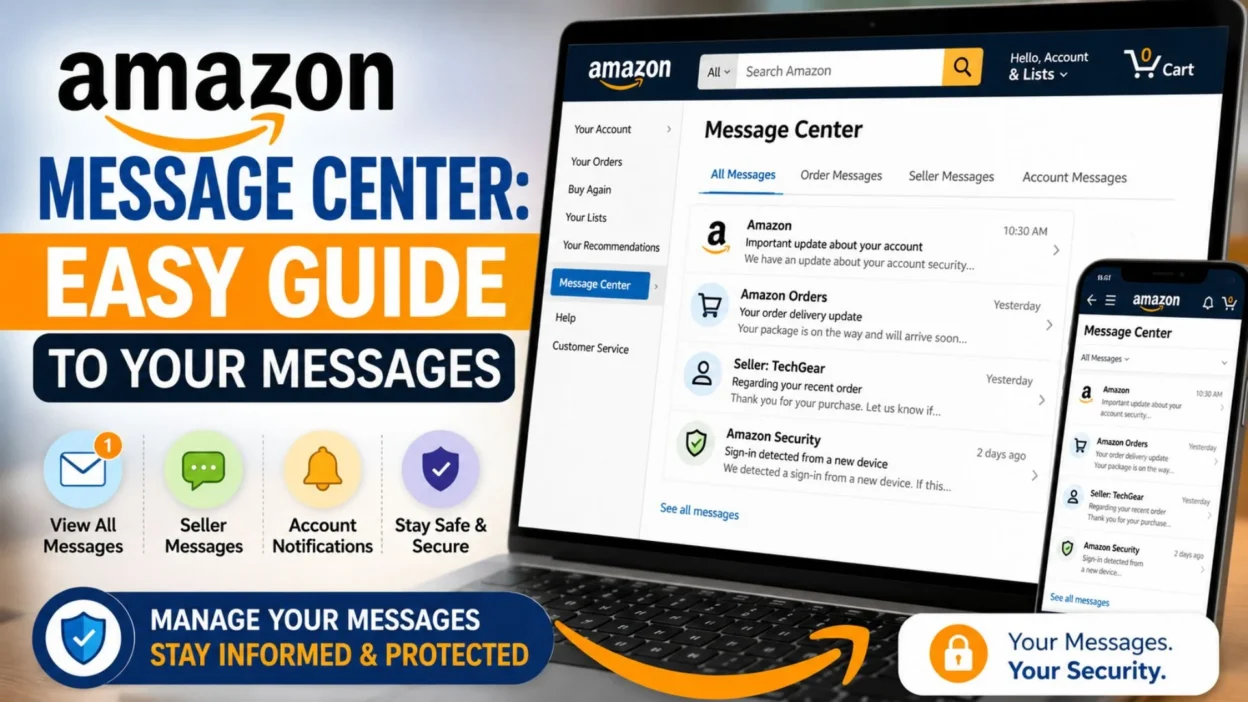
- The Amazon Message Center can help you review certain messages connected with your Amazon account. It is especially useful when you want to check communication related to orders, sellers, deliveries, or other account activity.
- However, knowing where to look matters. You may also want to distinguish genuine Amazon communication from suspicious emails or messages that ask for sensitive information.
- This guide explains the Amazon Message Center in simple terms. You will learn what it is, where to find it, what messages you may see, and what to check when you cannot find a message.
What Is Amazon Message Center?
- The Amazon Message Center is an area associated with your Amazon account where certain Amazon communications can be viewed.
- It can be useful when you want to review messages connected to your account instead of searching through a crowded email inbox.
- Depending on your account and Amazon’s current interface, the exact location and available message categories can vary.
- You may encounter communication related to orders, sellers, account activity, or other Amazon services.
- Think of it as a place to check when you remember receiving an Amazon-related message but cannot locate it elsewhere.
How to Find Amazon Message Center
- Finding your messages can be easier when you start from Amazon’s website and sign in to the correct account.
- Look through your account-related options for Message Center, Messages, or a similar communication area.
- Amazon can change its menus and page layouts, so the wording may not look exactly the same for every user.
- If you cannot immediately see the option, check your account pages carefully rather than assuming the message disappeared.
- You should also confirm that you are signed into the Amazon account connected with the order or activity you are checking.
What Can You Find in Amazon Message Center?
- The available messages can depend on your Amazon account and recent activity.
- Order-related communication may help you review information associated with purchases.
- Seller communication can be useful when a third-party seller has contacted you regarding an order.
- Account-related notices may provide information connected with your Amazon account or services.
- Delivery-related communication can sometimes help you understand updates connected with an order.
- Service notifications may also appear depending on the Amazon service you use.
- Remember that not every Amazon notification necessarily appears in the same place. Some communication may arrive through email, app notifications, or other account areas.
Amazon Message Center vs. Email
- It is easy to confuse Amazon’s account messages with ordinary email notifications.
- An email may arrive in your regular inbox, while some account communication may be available through Amazon itself.
- Checking Amazon directly can therefore be useful when you want to verify whether a communication is genuinely connected with your account.
- If an email asks you to click an unusual link, provide sensitive information, or make an unexpected payment, pause before responding.
- Instead, open Amazon through its official website or app and check your account independently.
- This simple habit can help you avoid relying on a questionable message to access your account.
Why You May Want to Check Your Messages
- Sometimes an email gets buried under dozens of newsletters and notifications.
- Other times, you may accidentally delete or overlook an important message.
- Checking your Amazon account directly gives you another way to review relevant communication.
- It can also help when you are trying to remember whether a seller contacted you about an order.
- For example, imagine that you ordered an item from a third-party seller. Later, you remember receiving a message but cannot find it in your email.
- Instead of searching endlessly through your inbox, checking the relevant Amazon account area may save time.
Quick Tips for Finding Amazon Messages
- Sign into the correct account. A different Amazon account may not show the communication you expect.
- Check your order details. Some communication makes more sense when viewed alongside the related purchase.
- Search your email too. Amazon may send notifications outside the Message Center.
- Check your spam folder. Legitimate notifications can occasionally be filtered by email providers.
- Use the Amazon app or website. Interface options can differ between platforms.
- Look for recent activity. Newer messages may be easier to identify than older communication.
- Avoid suspicious links. When something seems unusual, access Amazon directly instead.
What If Amazon Message Center Is Empty?
- An empty message area does not automatically mean something is wrong.
- You may simply have no messages available in that section.
- The communication you are looking for might also have been delivered through another channel, such as email or an Amazon notification.
- First, confirm that you are using the correct account.
- Next, check your email inbox and spam folder for Amazon-related notifications.
- If the issue concerns a particular purchase, open the relevant order and review its available details.
- Also, remember that Amazon regularly changes its website and app experience. A menu or message category can move over time.
- If you still cannot find important communication, Amazon Customer Service may be the best place to ask for account-specific help.
Stay Alert When Reading Amazon Messages
- Not every message that looks like Amazon communication is trustworthy.
- Scammers can imitate familiar brands and create messages designed to make people act quickly.
- Be especially cautious when a message unexpectedly asks for passwords, payment information, security codes, or other sensitive details.
- You should also be careful with urgent claims about account suspension, unexpected refunds, or unusual purchases.
- Rather than clicking a suspicious link, open Amazon independently and check your account.
- A genuine account check should not require you to trust an unfamiliar website simply because the message uses Amazon’s name.
- When something feels unusual, slowing down is usually smarter than reacting immediately.
How Amazon Message Center Helps With Seller Messages
- Buying from a third-party seller can sometimes create extra communication.
- A seller may need to contact you about an order, product details, delivery concerns, or another purchase-related matter.
- The Amazon Message Center can give you a place to review certain communication associated with your Amazon account.
- This can be helpful when you want to remember what a seller said before taking action.
- For example, you might receive a message about an order issue. Instead of relying only on memory, you can review the available communication and compare it with your order details.
- However, always consider the context. A message connected to an actual purchase should make sense alongside your account activity.
How to Check a Message Before Responding
- Before replying, read the entire message carefully.
- Check whether the conversation relates to an order you actually placed.
- Look at the seller or sender information available through Amazon.
- Then compare the communication with your order details.
- If something seems strange, do not rush.
- A legitimate message should not automatically convince you to share sensitive account information.
- Instead, use Amazon directly to verify the situation.
- This is especially important when a message creates pressure by claiming that you must act immediately.
What to Do When You Cannot Find a Seller Message
- Sometimes you remember receiving a message, but you cannot locate it later.
- First, make sure you are signed into the same Amazon account that placed the order.
- Next, check the relevant order information.
- You can also search your email for Amazon-related notifications.
- Look through your spam or junk folder if the message originally arrived by email.
- If you use the Amazon app, check your account and notification areas as well.
- Remember that Amazon’s interface can change. Therefore, instructions that match an older website design may not match what you see today.
- If the message is important and still cannot be found, Amazon Customer Service can provide account-specific assistance.
How to Find Messages Related to an Order
- Order-related communication is easier to understand when you know which purchase you are checking.
- Start by identifying the relevant order in your Amazon account.
- Review the order information and available communication options.
- Then compare the message with the product, seller, and order details.
- This can help you determine whether the message actually belongs to the purchase you are reviewing.
- For example, suppose you ordered headphones from a marketplace seller.
- Later, you receive communication mentioning headphones and a delivery concern.
- Checking the associated order can help you determine whether the communication makes sense.
- If the message refers to an order you never placed, stop and investigate before responding.
Amazon Message Center and Seller Communication
- Third-party sellers can communicate with customers through Amazon-supported channels.
- These conversations may involve questions or information related to a purchase.
- A seller might provide an update, respond to a question, or discuss an issue with an order.
- Keep your communication focused on the purchase.
- If a conversation moves toward unusual requests, take extra care.
- For instance, a request to communicate through an unfamiliar website deserves closer attention.
- Similarly, unexpected requests for payment details should raise a red flag.
- When possible, keep important purchase-related communication within Amazon’s supported channels.
Can You Delete Amazon Messages?
- Message availability and account features can change over time.
- Therefore, do not assume that every Amazon message can be deleted, permanently removed, or recovered in the same way.
- If you are trying to remove a particular message, check the options available in your current Amazon account interface.
- If there is no delete option, the message may simply remain available according to Amazon’s system.
- You should also avoid assuming that deleting an email removes the corresponding Amazon account communication.
- Different communication channels can work independently.
Why Amazon Messages May Look Different
- Amazon serves users across different countries and regions.
- Its website and app can also change as features are updated.
- Because of that, the Amazon Message Center may not look identical for everyone.
- You might see different labels, menus, or communication categories.
- The desktop website and mobile app can also present account features differently.
- So, if an older tutorial tells you to select a menu that you cannot find, the instructions may simply be outdated.
- Instead, look for current account, message, order, or communication options.
Amazon Message Center on Mobile
- Many shoppers manage Amazon orders from a phone.
- If you are using the Amazon app, start by signing into the correct account.
- Then explore your account, orders, notifications, and communication-related sections.
- The exact navigation can change as the app receives updates.
- Therefore, focus on the purpose of the feature rather than memorizing an old sequence of buttons.
- If you cannot find the message area in the app, using Amazon’s website may provide another way to locate the information.
- Always make sure you are using the official Amazon app or website.
Amazon Messages You Should Treat Carefully
- Some messages deserve extra attention because they involve sensitive account or financial information.
- Be cautious if a message unexpectedly asks for your password.
- Be cautious if someone asks for a security code.
- Be cautious if you are told to provide payment information through an unfamiliar page.
- Be cautious if a message claims your account will immediately close unless you click a link.
- Be cautious if someone asks you to make an unusual payment outside the expected Amazon process.
- Be cautious if a message concerns an order you never made.
- Instead of following the message’s instructions, access Amazon directly and check your account.
How to Recognize a Suspicious Amazon Message
- A suspicious message often tries to create urgency.
- It might tell you that something terrible will happen unless you act immediately.
- It may also contain strange wording, unexpected links, or requests that do not fit your normal Amazon experience.
- Another warning sign is a message about an order you do not recognize.
- However, appearance alone is not enough to establish whether communication is genuine.
- When in doubt, avoid clicking the message’s links.
- Open Amazon independently and check your account.
- This approach reduces the chance of being redirected to an imitation website.
What Information Should You Avoid Sharing?
- Your Amazon password should remain private.
- You should also protect security codes and other authentication information.
- Payment details deserve the same level of caution.
- Never share sensitive information simply because a message claims to come from Amazon.
- If someone asks for information that seems unnecessary, pause before responding.
- Instead, verify the issue through Amazon’s official account or customer support channels.
- Remember, a familiar logo or brand name does not automatically prove that a message is genuine.
What If You Receive a Message About an Unknown Order?
- An unfamiliar order notification can be unsettling.
- However, do not immediately click links inside the message.
- First, sign into your Amazon account through the official website or app.
- Then review your orders directly.
- If you do not see the order there, investigate further rather than trusting the message.
- You should also check whether someone else who has access to the account may have placed an order.
- If the activity still looks unfamiliar, use Amazon’s official support options to report the issue and ask for help.
Common Amazon Message Center Questions
- Why can’t I find my Amazon message? The message may belong to another communication channel, account, order, or notification area. Check your account, order details, email, and spam folder.
- Can Amazon messages appear in email? Amazon can send notifications through different channels. Therefore, checking your email as well as your Amazon account can be useful.
- Why does my Amazon Message Center look different? Amazon updates its website and app. Features and menu labels can change over time, and experiences may vary by region or account.
- Can I find old seller communication? Available message history depends on Amazon’s systems and your account. Check the relevant order and message areas first.
- Should I respond to every Amazon message? No. Read the message carefully and verify that it relates to your account or order before responding.
Simple Tips for Managing Amazon Communication
- Check the correct account. This is one of the easiest problems to overlook.
- Review your orders. Order information can provide important context.
- Keep important communication accessible. If a message matters, make a note of the related order.
- Check email notifications. Some communication may arrive outside Amazon’s account interface.
- Watch for unusual requests. Unexpected payment or account requests deserve extra caution.
- Avoid suspicious links. Access Amazon directly when something seems questionable.
- Keep your account secure. Use strong account security practices and protect your sign-in information.
- Ask Amazon for help when needed. Account-specific problems are often best handled through official support.
A Quick Way to Troubleshoot Missing Messages
- If your message seems to have disappeared, work through the basics first.
- Check your Amazon account.
- Confirm the correct email or account.
- Review the related order.
- Search your email inbox.
- Check spam and junk folders.
- Look at Amazon notifications.
- Try another official Amazon platform if necessary.
- Contact Amazon support if the communication remains important.
- This approach is simple, but it can prevent unnecessary frustration.
Why Checking Directly Is Better Than Guessing
- Searching for a missing message can lead you to old tutorials, random websites, or outdated instructions.
- That can make a simple problem more confusing.
- Instead, start with your own Amazon account.
- The current interface is more relevant to your account than instructions written for an older version of Amazon.
- This matters especially when security is involved.
- If a message asks you to take an unusual action, verify the situation directly through Amazon.
- In other words, don’t let a confusing message make the decisions for you.
Best Messages for Amazon Seller Communication
- These messages are useful when you need to contact a seller about an order. Keep your wording clear, polite, and focused on the issue.
- Hello, I’m contacting you about my recent order. Could you please provide an update on its status?
- Hi, could you please confirm when my order is expected to ship? Thank you for your help.
- Hello, I received my order, but I have a question about the item. Could you please help me?
- Hi, I’m having an issue with the product I received. Could you please advise me on the next step?
- Hello, could you please clarify the information provided for this order? I’d appreciate your help.
- Hi, I noticed an issue with my order details. Could you please check them and let me know what I should do?
- Hello, I’d like to ask about the delivery status of my order. Could you please provide an update?
- Thank you for responding. I appreciate your help with this order.
Copy-Paste Ready Amazon Messages
- Sometimes you know what you want to say but don’t want to spend ten minutes writing it.
- These short templates can help you explain common situations without unnecessary details.
- Order update: Hello, could you please provide an update on my order? I’d appreciate any information about its current status. Thank you.
- Delivery question: Hi, I’m checking on the delivery of my order. Could you please let me know if there is an updated delivery estimate?
- Product question: Hello, I have a question about this product. Could you please provide more information before I proceed?
- Order problem: Hi, I received my order, but there appears to be an issue. Could you please let me know how I can resolve it?
- Seller follow-up: Hello, I’m following up on my previous message. Could you please let me know if there is an update?
- Thank-you message: Thank you for your quick response and assistance. I appreciate your help.
Best Messages for Captions
- If you’re writing about your shopping experience, these short lines can work as casual captions.
- Amazon has entered the chat. 📦
- My cart had other plans.
- One order away from checking the tracking again.
- Waiting for the package like it’s a national event.
- The delivery notification is my favorite notification.
- Added to cart. Added to happiness.
- My order is coming, and suddenly patience matters.
- Package tracking: my unofficial daily hobby.
- Nothing says excitement like “out for delivery.”
- The box arrived. Productivity can wait.
Short Amazon Message Center Tips
- Check the right account: Make sure you are signed into the account connected with your order.
- Review your order: If a message concerns a purchase, compare it with the related order details.
- Check your email: Amazon may communicate through more than one channel.
- Avoid suspicious links: When something seems unusual, open Amazon directly instead.
- Protect sensitive information: Never share passwords, security codes, or payment details simply because a message requests them.
- Check current menus: Amazon’s website and app can change, so older tutorials may not match your screen.
- Use official support: For account-specific problems, Amazon’s own support options are the safest starting point.
How to Stay Safe With Amazon Messages
- A little caution can make online shopping much safer.
- If a message tells you that your account is in immediate danger, don’t panic. Instead, open Amazon independently and check your account.
- If you receive an unexpected order alert, verify your orders directly.
- Likewise, never assume that a message is genuine just because it contains Amazon branding.
- When something feels unusual, pause before clicking.
- Most importantly, keep passwords, security codes, and payment information private.
Frequently Asked Questions
What is the Amazon Message Center?
- The Amazon Message Center is an account-related area where certain Amazon communications can be reviewed. The messages available can vary depending on your account and activity.
Where can I find Amazon messages?
- Sign into the correct Amazon account and look through the available account, message, notification, and order-related sections. Amazon can change its navigation, so the exact location may vary.
Why can’t I see an Amazon message?
- The message may have arrived through another channel. Check your Amazon account, related order, email inbox, and spam folder. Also, confirm that you are using the correct account.
Can I message an Amazon seller?
- Amazon supports communication between customers and sellers in appropriate situations. If you need help with an order, use Amazon’s available communication options and keep the conversation focused on the purchase.
Is every Amazon-looking message genuine?
- No. A message can imitate a familiar company. Be cautious with unexpected links, urgent demands, unusual payment requests, or requests for sensitive information. Verify the situation through Amazon directly.
Final Thoughts on Amazon Message Center
- The Amazon Message Center can be a helpful place to check when you need to review Amazon-related communication. However, it is only one part of the larger communication experience.
- If you cannot find a message, don’t assume it has vanished. Check your Amazon account, related order, email inbox, spam folder, and other official notification areas.
- Also, remember that Amazon can update its website and app. As a result, menus and message locations may change over time.
- Security matters, too. When a message asks for sensitive information or pushes you toward an unfamiliar link, take a moment to verify it through Amazon directly.
- Save this guide if you regularly shop online. It can help you troubleshoot confusing messages without unnecessary frustration.
- In the end, the smartest approach is simple: check carefully, verify directly, and never let a suspicious message rush you.

Emma Richardson is a content writer passionate about creating heartfelt messages, wishes, and greetings for every occasion. She enjoys helping readers express their emotions with meaningful words that strengthen relationships and celebrate life’s special moments.