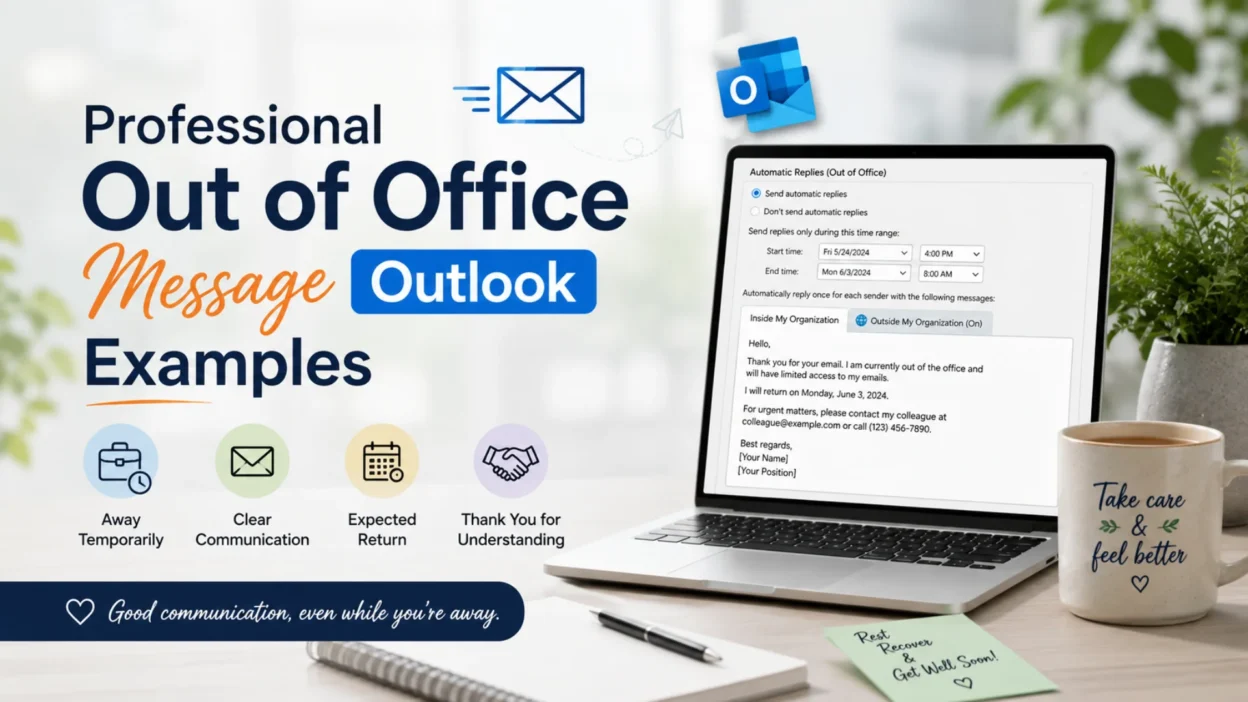
Whether you’re heading on vacation, attending a conference, taking parental leave, or simply stepping away from work, setting an effective out of office message Outlook autoresponder helps manage expectations and keeps communication professional.
A great out-of-office reply should be clear, polite, and informative. It lets senders know you’re unavailable, when you’ll return, and who they can contact if their matter is urgent. Fortunately, you don’t need to spend time writing one from scratch.
In this guide, you’ll find professional, friendly, and copy-and-paste-ready out of office message Outlook templates for every situation. Simply choose the one that fits your schedule, customize a few details, and activate your automatic reply with confidence.
📧 Top Out of Office Message Outlook Templates
These templates work well for most professional situations.
- 📩 Thank you for your email. I am currently out of the office and will return on [Date]. I will respond as soon as possible after I return.
- 🌴 I am away from work until [Date] with limited access to email. Thank you for your patience.
- 💼 I appreciate your message. I am currently out of the office and will reply promptly upon my return on [Date].
- 📅 Thank you for reaching out. I am unavailable until [Date]. If your request is urgent, please contact [Name] at [Email].
- ✨ I am currently away from the office and unable to respond immediately. I look forward to assisting you when I return.
- 🌿 Thanks for your email. I am taking time away from work and will respond after [Date].
- 📨 I am out of the office with limited email access. I appreciate your understanding.
- 🤝 Thank you for your message. I will reply as soon as I am back in the office.
- 🌞 I am currently unavailable and will return on [Date]. Thank you for your patience.
- 💙 Your email is important to me. I will respond as soon as possible after returning.
✉️ Short Out of Office Message Outlook Templates
Need something brief and professional? These short messages are perfect.
- 📧 Thank you for your email. I am out of the office until [Date].
- 🌴 I am currently away and will reply upon my return.
- 📅 Out of office until [Date]. Thank you for your patience.
- 💼 I have limited email access and will respond soon.
- 📩 Thank you for reaching out. I’ll reply when I return.
- ✨ Away from the office until [Date].
- 🌿 Currently unavailable. I appreciate your understanding.
- 🤝 I’ll respond as soon as I’m back.
- 📨 Thanks for your email. I look forward to connecting soon.
- 💙 Your message has been received.
🌴 Out of Office Message Outlook for Vacation
These messages are ideal for annual leave or vacations.
- 🌞 Thank you for your email. I am currently on vacation until [Date] and will respond when I return.
- 🏖️ I am enjoying some time away from the office. I appreciate your patience and will reply after [Date].
- ✈️ I am away on annual leave with limited access to email.
- 🌊 Thank you for your message. I am out of the office until [Date] enjoying a planned vacation.
- 🌺 I will return refreshed and ready to assist you on [Date].
- 🌴 I am currently out of the office. For urgent assistance, please contact [Name].
- ☀️ Thanks for reaching out. I look forward to responding after my vacation.
- 🌼 I appreciate your email and will reply promptly upon my return.
- 🧳 I am taking a short break from work and will reconnect soon.
- 💙 Thank you for your understanding while I am away.
🤝 Friendly Out of Office Message Outlook Templates
These replies sound warm while remaining professional.
- 😊 Thanks for your email! I’m currently away from the office and will get back to you as soon as I return.
- 🌸 I appreciate your message. I’m taking a short break and will reply after [Date].
- 💛 Thanks for reaching out. I’ll respond as quickly as possible when I’m back.
- 🌿 I’m currently out of the office, but I look forward to connecting with you soon.
- ✨ Thank you for your patience while I’m away.
- 💼 I appreciate your understanding and will respond upon my return.
- 🌞 Looking forward to assisting you soon.
- 📩 Your email has been safely received.
- 🤍 I’ll be back in the office on [Date].
- 💙 Wishing you a wonderful day, and thank you for your patience.
💼 Out of Office Message Outlook for Business Travel
Business trips often require a professional autoresponder.
- ✈️ Thank you for your email. I am currently traveling for business until [Date] and may have limited access to email.
- 📅 I am attending meetings and will reply as soon as my schedule allows.
- 🌍 I appreciate your message and will respond promptly upon my return.
- 💼 If your request requires immediate attention, please contact [Name].
- 📩 Thank you for your understanding while I am away on business.
- 🤝 I look forward to connecting with you after [Date].
- 🌿 My responses may be delayed due to travel commitments.
- ✨ Your patience is greatly appreciated.
- 📨 I will reply as soon as I have regular access to email.
- 💙 Thank you for reaching out.
🤒 Out of Office Message Outlook for Sick Leave
When you’re away due to illness, keep your automatic reply brief and professional.
- 🤍 Thank you for your email. I am currently out of the office due to illness and will respond as soon as I return.
- 🌿 I am taking sick leave and have limited access to email. Thank you for your patience.
- 💙 I appreciate your message. I am currently unavailable for health reasons and will reply when I am back.
- 📅 I expect to return on [Date]. If your matter is urgent, please contact [Name] at [Email].
- 🌸 Thank you for your understanding while I focus on recovery.
- 💼 I am temporarily away from work and will respond as soon as possible.
- 🙏 I appreciate your patience during my absence.
- 📧 Your email has been received and will be answered after my return.
- ✨ Thank you for reaching out. I look forward to assisting you soon.
- 🌼 Wishing you a wonderful day, and thank you for your understanding.
🎄 Out of Office Message Outlook for Holidays
These templates are ideal for Christmas, New Year, Thanksgiving, or other public holidays.
- 🎁 Thank you for your email. I am out of the office for the holidays until [Date].
- 🎄 Wishing you a joyful holiday season! I will respond when I return.
- ✨ Happy Holidays! Thank you for your message and your patience.
- ❄️ I am currently away celebrating the holidays with family and friends.
- 🌟 I look forward to connecting with you after [Date].
- 🎅 For urgent assistance, please contact [Name] while I am away.
- 📩 Your email is important and will receive my attention upon my return.
- 🕊️ Thank you for your understanding during the holiday break.
- 🌠 Have a safe and happy holiday season!
- 💙 Best wishes, and I’ll be back soon.
👶 Out of Office Message Outlook for Maternity Leave
These replies share your leave professionally and warmly.
- 💕 Thank you for your email. I am currently on maternity leave and will return on [Date].
- 👶 During my leave, please contact [Name] at [Email] for immediate assistance.
- 🌸 I appreciate your patience and look forward to reconnecting after my return.
- 🤍 I am spending valuable time with my growing family and will reply once I return.
- 🌷 Thank you for your understanding during this special time.
- 💖 Your email has been received and will be answered when I resume work.
- 🌼 For urgent matters, please contact my colleague listed above.
- ✨ Wishing you all the best, and thank you for your patience.
- 📧 I appreciate your message and look forward to speaking with you soon.
- 💙 Thank you for your continued support.
👨👧 Out of Office Message Outlook for Paternity Leave
Professional templates for welcoming a new family member.
- 👶 Thank you for your email. I am currently on paternity leave until [Date].
- 💙 During my absence, please contact [Name] for urgent matters.
- 🌿 I appreciate your understanding while I spend time with my family.
- 📅 I will respond as soon as possible after returning to work.
- 🤍 Thank you for your patience and support.
- ✨ Your email has been received and will be answered upon my return.
- 💼 I look forward to reconnecting with you soon.
- 🌸 Wishing you a wonderful day.
- 📩 Thank you for reaching out.
- 🌟 I appreciate your understanding.
🛎️ Customer Service Out of Office Message Outlook
Perfect for support teams and customer-facing businesses.
- 📧 Thank you for contacting us. Our team has received your message.
- 💼 We are currently unavailable and will respond within [Timeframe].
- 🌿 Your request is important to us, and we appreciate your patience.
- 🤝 If your matter is urgent, please call [Phone Number].
- 📩 We look forward to assisting you as soon as possible.
- 🌸 Thank you for choosing our services.
- 💙 Our office is currently closed, but we’ll be back soon.
- ✨ Your inquiry has been successfully received.
- 🌞 Thank you for your patience while we are away.
- 📅 We appreciate your understanding.
👥 Internal Team Out of Office Message Outlook
Use these replies for coworkers within your organization.
- 💼 Hi! I’m currently out of the office until [Date].
- 📅 For urgent internal matters, please contact [Colleague’s Name].
- 🌿 I’ll catch up on emails as soon as I return.
- 🤝 Thanks for your understanding and support.
- 📩 Please expect a reply after [Date].
- 💙 I appreciate your patience.
- 🌸 Looking forward to reconnecting soon.
- ✨ Thanks for reaching out.
- 🌞 Have a productive week!
- 📧 I’ll respond as quickly as possible upon my return.
📋 Copy-and-Paste Professional Out of Office Message Outlook Templates
These complete templates are ready to use with only a few edits.
- 📩 Thank you for your email. I am currently out of the office until [Date] and have limited access to email. I will respond as soon as possible upon my return. If you require immediate assistance, please contact [Name] at [Email]. Thank you for your understanding.
- 🌴 I appreciate your message. I am away on leave until [Date]. During this time, I may not be able to reply promptly. For urgent matters, please contact [Name]. Otherwise, I look forward to assisting you when I return.
- 💼 Thank you for reaching out. I am currently unavailable and will return on [Date]. Your email is important to me, and I will respond as quickly as possible after I’m back in the office.
- ✈️ I am traveling for business and have limited access to email until [Date]. If your request cannot wait, please contact [Name] at [Email]. Thank you for your patience.
- 🤍 Thank you for your email. I am currently away from the office and will return on [Date]. I appreciate your understanding and look forward to connecting with you soon.
💬 One-Line Out of Office Message Outlook Templates
Need a quick automatic reply? These one-line messages are simple and effective.
- 📧 Thank you for your email. I am out of the office until [Date].
- 🌴 I am currently away and will respond upon my return.
- 💼 I have limited access to email today.
- 📅 I will reply as soon as I am back in the office.
- 🤝 Thank you for your patience and understanding.
- 🌿 Your message has been received.
- 📩 I appreciate your email and will respond soon.
- ✨ Currently unavailable. I look forward to assisting you later.
- 💙 Away from the office until [Date].
- 🌸 Thank you for reaching out.
- 🌞 I’ll get back to you as soon as possible.
- 📨 I appreciate your patience while I’m away.
- 🤍 For urgent matters, please contact [Name].
- 🌼 I’ll respond promptly after I return.
- 💖 Thank you for your understanding.
- ✈️ Traveling with limited email access.
- 🧳 Currently on leave until [Date].
- 📬 Looking forward to reconnecting soon.
- 🌟 Thank you for your message.
- 💼 I’ll be back in the office shortly.
💡 Tips for Writing an Effective Outlook Out of Office Message
A great out of office message Outlook is short, informative, and professional. Keep these best practices in mind:
- ✅ Clearly mention that you’re out of the office.
- ✅ Include your return date whenever possible.
- ✅ Mention if you’ll have limited or no access to email.
- ✅ Provide an alternate contact for urgent matters.
- ✅ Keep your tone polite and professional.
- ✅ Avoid sharing unnecessary personal details.
- ✅ Proofread your message before enabling automatic replies.
- ✅ Update your message if your return date changes.
- ✅ Use a different version for internal and external recipients if needed.
- ✅ End with a polite thank-you or appreciation.
📱 Best Out of Office Message Outlook Examples for Different Situations
Choose the template that best matches your situation:
- 🌴 Vacation or annual leave
- 💼 Business travel
- 🤒 Sick leave
- 👶 Maternity leave
- 👨👧 Paternity leave
- 🎄 Holiday closure
- 📅 Conference attendance
- 🏠 Personal leave
- 🛎️ Customer service auto replies
- 👥 Internal team notifications
❓ Frequently Asked Questions (FAQs)
📧 What should an Outlook out of office message include?
A professional out-of-office reply should explain that you’re unavailable, provide your return date, mention limited email access if applicable, and include an alternate contact for urgent requests.
💼 How long should an out of office message be?
Keep it concise. Most effective automatic replies are between 40 and 100 words, providing only the essential information.
🌴 Should I include the reason I’m away?
Not necessarily. You can simply state that you’re out of the office. If you prefer, you may mention that you’re on vacation, business travel, or leave, but detailed explanations are unnecessary.
🤝 Should I provide another contact person?
Yes. If urgent assistance may be needed during your absence, include a colleague’s name, email address, or phone number whenever appropriate.
📅 When should I turn on my Outlook automatic reply?
Enable your automatic reply just before leaving and schedule it to turn off on your return date so contacts receive accurate information.
💙 Conclusion
A well-written out of office message Outlook helps maintain professional communication even when you’re away from your desk. It reassures clients, coworkers, and business partners that their message has been received while setting clear expectations about when they can expect a response.
Whether you’re taking a well-earned vacation, traveling for work, recovering from illness, or enjoying time with your family, choosing the right automatic reply reflects professionalism and respect for your contacts. Use these ready-made templates as they are or personalize them to match your role, company, and communication style.
Save your favorite templates so you’ll always have the perfect out-of-office response ready whenever you need it.

Emma Richardson is a content writer passionate about creating heartfelt messages, wishes, and greetings for every occasion. She enjoys helping readers express their emotions with meaningful words that strengthen relationships and celebrate life’s special moments.