If you searched for NSA warning message settings iPhone, you may be trying to understand a warning that appears when your iPhone detects potentially sensitive content. The wording can be confusing, especially when you are simply trying to figure out why a photo or video is blurred or why a warning appears in Messages.
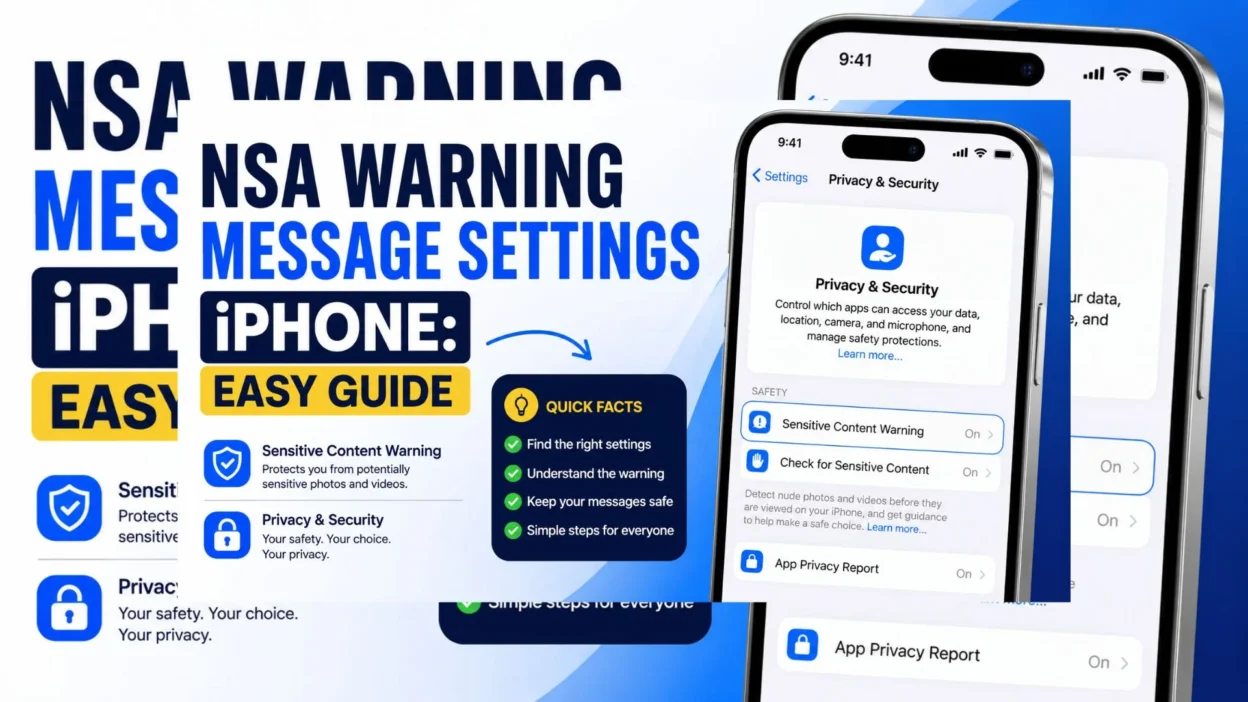
Apple’s official feature is called Sensitive Content Warning. It can detect photos and videos that may contain nudity and blur them before you view them. The feature can work in Messages, AirDrop, shared photo albums, Contact Posters, and FaceTime video messages on supported Apple devices.
The good news is that the setting is easy to find. You can also understand the difference between Sensitive Content Warning and Communication Safety, which is especially useful when checking Screen Time settings.
Top NSA Warning Message Settings iPhone Explained
The phrase “NSA warning” can lead to confusion. Here are the key points to know when looking through your iPhone settings.
- Sensitive Content Warning is Apple’s official name for this protection feature.
- The feature can blur potentially sensitive images or videos before you view them.
- Messages is one of the supported locations where Sensitive Content Warning can work.
- The feature is designed to reduce unwanted exposure to sensitive visual content.
- The warning does not mean your entire message is unsafe. It specifically relates to content that the device identifies as potentially sensitive.
- Detection happens on the device. Apple says its on-device technology analyzes the photos and videos without sending the detection result to Apple.
- You can manage the feature in Settings. The current path is Settings > Privacy & Security > Sensitive Content Warning.
- Supported apps can be managed individually after Sensitive Content Warning is enabled.
- The feature requires compatible software. Apple lists iOS 17 or later for Sensitive Content Warning.
- Communication Safety is different. It provides additional protections for children and is managed through Screen Time.
- Communication Safety can automatically enable Sensitive Content Warning when it is turned on through Screen Time.
- The warning may give you choices instead of immediately displaying the potentially sensitive image. Apple says the alert can provide options to view the content or access safety resources.
Short NSA Warning Message Settings iPhone Guide
If you only need the basic information, these quick points cover the setting without unnecessary technical details.
- Official setting: Sensitive Content Warning
- Main location: Settings > Privacy & Security
- Main purpose: Warn before potentially sensitive photos or videos are viewed
- Messages support: Yes, on supported Apple devices
- Detection: Performed on the device
- Minimum software: iOS 17 or later for Sensitive Content Warning
- Child safety feature: Communication Safety
- Communication Safety location: Settings > Screen Time > Communication Safety
- What you may see: A blurred image with a warning
- Privacy: Apple says the device analyzes the content on-device
- Other supported areas: AirDrop, shared photo albums, Contact Posters, and FaceTime video messages
- Best place to start: Check Sensitive Content Warning under Privacy & Security
Best NSA Warning Message Settings iPhone Tips for Sharing
Sometimes you want to explain the warning to a friend or family member without making the conversation complicated. These simple lines can help.
- “The iPhone warning is related to Apple’s Sensitive Content Warning feature.”
- “If a photo is blurred in Messages, check Sensitive Content Warning in Privacy & Security.”
- “Apple uses on-device technology to check for potentially sensitive images.”
- “The official Apple setting is called Sensitive Content Warning, not NSA warning.”
- “You can find Sensitive Content Warning under Settings > Privacy & Security.”
- “Communication Safety and Sensitive Content Warning are related, but they are not exactly the same feature.”
- “Communication Safety is managed through Screen Time.”
- “Sensitive Content Warning can protect you from unexpectedly viewing certain images.”
- “A warning does not necessarily mean the entire conversation is problematic.”
- “The iPhone may blur an image before you decide whether to view it.”
- “If you cannot find the option, check whether your iPhone software supports the feature.”
- “Updating your iPhone can help you access the latest safety features.”
- “Apple designed these protections with privacy in mind.”
- “Messages is one of the places where Sensitive Content Warning can operate.”
- “If you see a sensitive-content alert, read the warning before choosing what to do.”
One-Line NSA Warning Message Settings iPhone Answers
These quick answers are useful when you want a simple explanation without a long guide.
- “Apple’s official feature is called Sensitive Content Warning.”
- “Find it under Settings > Privacy & Security > Sensitive Content Warning.”
- “Sensitive Content Warning can blur potentially sensitive images.”
- “Messages supports Sensitive Content Warning on compatible iPhones.”
- “Communication Safety is available through Screen Time.”
- “Sensitive Content Warning uses on-device analysis.”
- “The warning is designed to reduce unwanted exposure to sensitive content.”
- “An image may be blurred before you choose to view it.”
- “NSA warning is not the official Apple name for this feature.”
- “Check Privacy & Security if you are looking for the warning setting.”
- “Check Screen Time if you are looking for Communication Safety.”
- “Apple says sensitive-content detection happens on your device.”
- “The feature can also work outside Messages in supported areas.”
- “Keeping iOS updated can help ensure you have current protections.”
- “The warning gives you more control over what you choose to view.”
Why Does an iPhone Show a Warning in Messages?
Seeing a warning in Messages can be surprising if you have never used Sensitive Content Warning before. The feature is designed to give you a moment to decide what you want to view.
- Your iPhone may blur a photo or video that it identifies as potentially sensitive.
- The warning can appear before the visual content is displayed.
- The feature focuses on photos and videos rather than ordinary text messages.
- A warning does not automatically mean the sender did something wrong.
- The system is designed to help prevent unexpected exposure to sensitive imagery.
- Apple says the detection uses on-device technology.
- The analysis is intended to happen without sending the detection information to Apple.
- You can review the warning before deciding what to do.
- Depending on the situation, the alert may provide safety information.
- The feature can be especially useful when messages arrive unexpectedly.
- It can also help people maintain more control over visual content on their devices.
- The warning is a safety feature, not a general message scanner.
- It does not mean that every photo received in Messages will be blurred.
- The result can depend on the content and the device’s available features.
- If the warning seems unexpected, check your Sensitive Content Warning settings.
NSA Warning vs. Sensitive Content Warning on iPhone
Many people search for NSA warning message settings iPhone because they see unfamiliar wording or hear someone describe the feature as an “NSA warning.”
- Sensitive Content Warning is Apple’s official feature name.
- “NSA warning” is not the name Apple uses for this setting.
- Sensitive Content Warning is designed to warn about potentially sensitive visual content.
- The feature can apply to Messages on supported devices.
- It can also work in several other supported Apple features.
- Communication Safety is a separate safety feature available through Screen Time.
- Communication Safety is designed with child safety in mind.
- Screen Time can provide additional controls for younger users.
- Communication Safety can automatically turn on Sensitive Content Warning in certain situations.
- The two features can therefore appear connected.
- Their names and purposes are still different.
- Sensitive Content Warning is found under Privacy & Security.
- Communication Safety is managed through Screen Time.
- Knowing the official names makes iPhone settings easier to understand.
- When searching for help, use “Sensitive Content Warning” for the most accurate Apple results.
What Is Communication Safety on iPhone?
Communication Safety is an Apple feature that provides additional protections for children when potentially sensitive images are involved.
- Communication Safety is managed through Screen Time.
- It can help children avoid unexpectedly viewing sensitive images.
- It can provide guidance when potentially sensitive content is detected.
- Apple designed the feature as part of its communication safety tools.
- Communication Safety and Sensitive Content Warning can work together.
- Parents or guardians may manage relevant Screen Time settings.
- The available controls can vary according to the device and software version.
- Family settings can affect how communication safety features work.
- Communication Safety should not be confused with ordinary message filtering.
- It is focused on safety around potentially sensitive visual content.
- Sensitive Content Warning is the broader setting you may see under Privacy & Security.
- If you are troubleshooting a warning on a child’s iPhone, Screen Time may be worth checking.
- If you are simply looking for the general content-warning setting, check Privacy & Security.
- Apple continues to update its safety features across newer software versions.
- Checking Apple’s current iPhone settings is the best way to confirm the exact options available.
Why Is My Message Photo Blurred on iPhone?
A blurred image can make you wonder whether something is wrong with Messages. In many cases, the blur is simply part of Apple’s sensitive-content protection.
- The image may have been identified as potentially sensitive.
- Sensitive Content Warning can place a blur over certain visual content.
- The blur gives you a chance to make an informed choice.
- The feature does not necessarily indicate that your Messages app has a problem.
- Your iPhone may still receive the message normally.
- The visual preview can remain hidden until you choose an available option.
- The warning can help prevent accidental exposure.
- You can check your settings if you want to understand why the feature is active.
- Go to Settings > Privacy & Security > Sensitive Content Warning.
- Check which supported apps are included.
- If the setting is controlled through Communication Safety, check Settings > Screen Time as well.
- Make sure your iPhone has a supported iOS version.
- Avoid assuming that every blurred photo contains inappropriate material.
- The feature is designed to identify potentially sensitive content, so results are not a judgment about the sender.
- If you are still unsure, reviewing Apple’s current support information can clarify the available controls.
How to Manage Sensitive Content Warning in Messages
Once you know where the setting is located, managing it becomes much easier.
- Open Settings on your iPhone.
- Tap Privacy & Security.
- Select Sensitive Content Warning.
- Review the apps and services listed there.
- Check whether Messages is included.
- Turn the feature on if you want the warning protection.
- Review the available options before changing anything.
- If the feature is already active, check the supported apps to understand where it applies.
- If you are managing a child’s device, also review Screen Time settings.
- Look for Communication Safety under Screen Time.
- Keep your iPhone updated for the latest supported safety controls.
- Restarting the Messages app can sometimes help after changing settings.
- If a setting is unavailable, check whether restrictions or family controls affect it.
- Do not confuse Sensitive Content Warning with spam filtering.
- Sensitive Content Warning is specifically associated with potentially sensitive visual content.
Common Questions About NSA Warning Message Settings iPhone
Understanding the difference between Apple’s feature names can remove much of the confusion.
- Is NSA Warning an official iPhone setting? No. Apple calls the relevant feature Sensitive Content Warning.
- Can Sensitive Content Warning work in Messages? Yes. Messages is one of the supported areas on compatible Apple devices.
- Where can I find Sensitive Content Warning? Go to Settings > Privacy & Security > Sensitive Content Warning.
- Why does my iPhone blur a photo? The device may have identified the image as potentially sensitive and blurred it before you view it.
- Is Communication Safety the same thing? No. Communication Safety is a related safety feature managed through Screen Time, while Sensitive Content Warning is a separate setting.
- Does the warning mean my iPhone is hacked? No. A sensitive-content warning is a normal safety feature and does not by itself indicate a security problem.
- Does the feature read every message? Sensitive Content Warning is focused on supported photos and videos. Apple says its sensitive-content detection is performed on the device.
- Can the setting change after an iOS update? The available controls can change as Apple updates iOS, so checking the current Settings app is the most reliable approach.
- Why can’t I find Sensitive Content Warning? Your iPhone may not support the feature, the software may need updating, or another setting may affect what is available.
- Where should I look for child safety controls? Check Settings > Screen Time > Communication Safety on supported devices.
Copy-Paste Ready Messages
These short messages are useful when someone asks why a warning or blurred image appeared on an iPhone.
- “That warning is likely related to Apple’s Sensitive Content Warning feature.”
- “Check Settings > Privacy & Security > Sensitive Content Warning.”
- “Apple calls the feature Sensitive Content Warning, not NSA Warning.”
- “If a photo is blurred, your iPhone may have detected potentially sensitive content.”
- “The warning gives you a chance to decide whether you want to view the image.”
- “Messages is one of the apps where Sensitive Content Warning can work.”
- “If you are checking a child’s iPhone, look under Screen Time for Communication Safety.”
- “Sensitive Content Warning and Communication Safety are related, but they are different settings.”
- “Try updating iOS if you cannot find the setting.”
- “A content warning by itself does not mean your iPhone has a security problem.”
- “Apple says sensitive-content detection happens on the device.”
- “Check Privacy & Security first if you are looking for the general content-warning setting.”
- “Check Screen Time if you are looking for Communication Safety.”
- “A blurred image can simply be the iPhone’s safety protection doing its job.”
- “The setting is designed to reduce unexpected exposure to sensitive visual content.”
FAQ About NSA Warning Message Settings iPhone
What is the NSA warning message on iPhone?
The phrase NSA warning is not Apple’s official terminology. When people use it in searches, they may be referring to Sensitive Content Warning, Apple’s feature for warning about potentially sensitive photos and videos.
Where is Sensitive Content Warning on iPhone?
You can generally find it by opening Settings > Privacy & Security > Sensitive Content Warning. The exact options may depend on your iOS version and device.
Why does Messages show a sensitive-content warning?
Your iPhone may show the warning when its on-device technology identifies a photo or video as potentially sensitive. The image can be blurred before you choose whether to view it.
Is Sensitive Content Warning the same as Communication Safety?
No. They are separate but related safety features. Sensitive Content Warning is a general content-protection setting, while Communication Safety is managed through Screen Time and provides additional protections for children.
Does the warning mean someone is monitoring my messages?
No. A Sensitive Content Warning is a device safety feature. Apple says the detection happens on-device, rather than sending the detection information to Apple.
Final Thoughts
Understanding NSA warning message settings iPhone becomes much easier once you know the official Apple terminology. The feature you are probably looking for is Sensitive Content Warning, which can warn you before potentially sensitive photos or videos are displayed.
If you see a blurred image in Messages, there is usually no need to panic. The warning is designed to give you more control over what appears on your screen. You can review the setting under Settings > Privacy & Security > Sensitive Content Warning.
It is also helpful to remember the difference between Sensitive Content Warning and Communication Safety. If you are checking child safety controls, Screen Time may contain the setting you need.
Save this guide if you often troubleshoot iPhone settings, and share it with someone who has been confused by an unexpected content warning. The right setting is easier to find when you know what Apple actually calls it.

Emma Richardson is a content writer passionate about creating heartfelt messages, wishes, and greetings for every occasion. She enjoys helping readers express their emotions with meaningful words that strengthen relationships and celebrate life’s special moments.